What Does "Link in Bio" Mean? Explained for Every Platform
What "link in bio" means on Instagram, TikTok, Facebook and YouTube, where to find the link, and why creators use one.
 Link in Bio
What does "link in bio" mean?
If you've scrolled through Instagram, TikTok, or Facebook and seen someone say "check the link in my bio," you're not alone in wondering what that actually means.
Here's the plain version: link in bio means there's a clickable URL on that person's profile page, and they want you to go tap it. The "bio" is the short description section at the top of any social media profile. The "link" is the website URL sitting inside that section.
Creators and businesses say "link in bio" because most social platforms won't let you put clickable links inside individual posts. You can't tap a URL in an Instagram caption and have it open a browser. TikTok works the same way. So the bio section becomes the one reliable place to share a clickable link with your audience.
That's the meaning of link in bio in social media, and it's the same concept on every platform.
Why do creators keep saying it?
The phrase caught on around 2016. Instagram had removed clickable links from photo captions, and creators needed a way to point followers toward their content, products, or websites. "Link in bio" became the standard shorthand.
It stuck because it works. When someone says "tap the link in my bio" at the end of a TikTok or writes "click the link in bio" in a caption, followers know exactly what to do. It's become one of the most recognizable calls to action in social media.
You'll hear variations everywhere: "link in bio," "click link in bio," "tap link in bio." They all mean the same thing. Go to my profile, find the URL, and tap it.
Where to find it on each platform
The steps are almost identical everywhere, but each platform has its quirks.
Instagram is where the phrase started. So what does "link in bio" mean on Instagram? It means the same thing it means everywhere else: visit the creator's profile and look just below the bio text, above the post grid, for a clickable URL.
Instagram has allowed up to five links directly in the bio section since 2023. For years before that, you only got one. Five is helpful, but many active creators still use a link-in-bio tool because they're promoting more than five things at any given time.
To find the link: tap the person's username, then look below their bio text for clickable URLs.
→Instagram link limits
Instagram has allowed up to five bio links since 2023. If you need more, a link-in-bio tool gives you a single URL that opens a page with all your links. See our best link-in-bio picks for Instagram.
TikTok
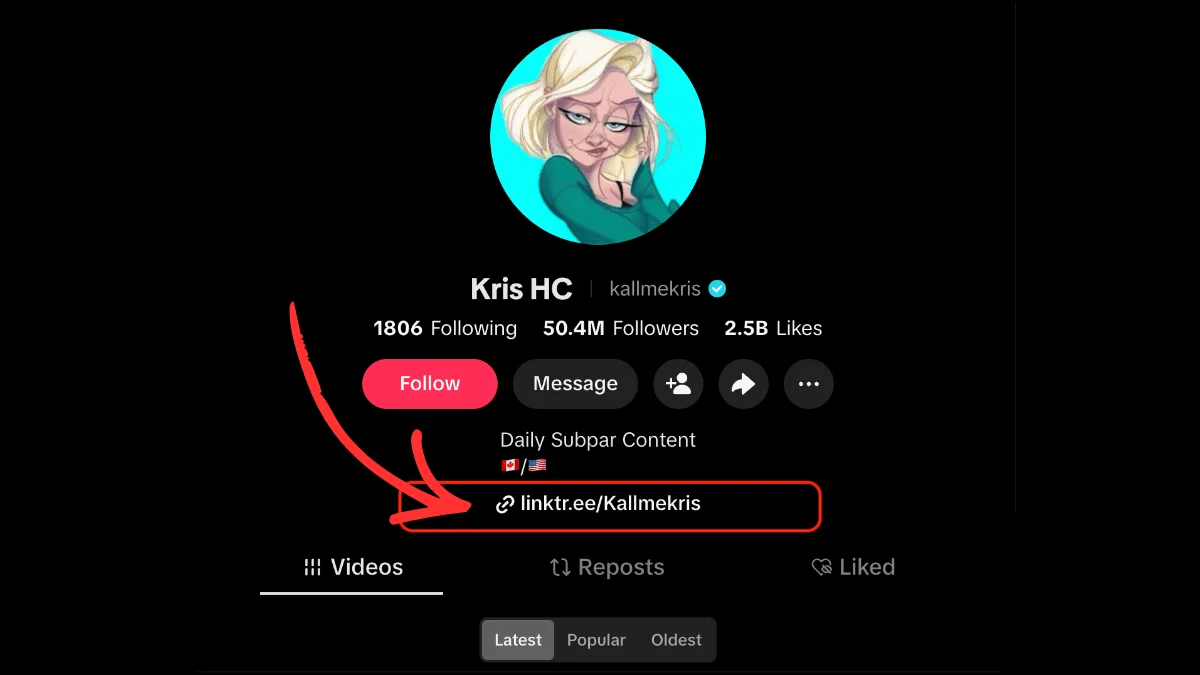
What does "link in bio" mean on TikTok? Same concept, one extra requirement: you need at least 1,000 followers (or a business account) before TikTok lets you add a clickable link to your bio.
Once you qualify, the link appears as a small clickable URL or globe icon under your username. Tap the creator's profile picture, then look below their bio text.
Because TikTok's in-app browser tends to load slowly, lightweight link pages that open in under two seconds hold visitors better than heavy websites. Speed really matters here.
What is a link in bio on Facebook? Technically, it works the same way. Your Facebook profile or Page has a bio section where you can add a website URL.
But here's the thing: Facebook lets you post clickable links directly in status updates. Unlike Instagram and TikTok, there's no restriction. So when it says "link in bio" on Facebook, it's often a crossover habit from creators who are used to saying it on other platforms. It still works. It just isn't as necessary.
YouTube
YouTube allows clickable links in video descriptions, so creators don't need to rely on their bio link as heavily. But the "About" section on a YouTube channel can hold multiple URLs, and some creators point viewers there for permanent links like their website, merch store, or newsletter.
You'll sometimes hear YouTubers say "link in the description" instead, which is YouTube's version of the same idea.
Why most creators use a link-in-bio tool
When you only get one URL in your bio (or even five), you run into a problem fast. You're promoting a course, a newsletter, a new video, a podcast, and a collab, all at the same time. One link can't do all of that.
That's why link-in-bio tools exist. They give you a single permanent URL that opens a link-in-bio page with multiple links. You set the URL once in your bio and update the page whenever your priorities shift. Old posts that say "link in bio" still work because the URL never changes.
Popular options include Linktree, Beacons, and Stan Store. Some are free and simple. Others include built-in stores, email capture, and analytics. You can browse our tool directory to compare them, or use our comparison builder to put any two or three of them side by side on price and features.
What happens when you tap a link in bio
If you're brand new to this, here's exactly what the experience looks like:
- You see a post or video where the creator says "link in bio"
- You tap their username or profile picture to visit their profile
- You find the clickable URL in their bio section (the placement varies slightly by platform)
- You tap the URL
- It opens in a browser, either the in-app browser or your phone's default browser
- You land on whatever page the creator linked to, whether that's a website, a product page, or a link-in-bio landing page with multiple options
That's it. The whole process takes about five seconds.
Frequently Asked Questions
What does 'link in bio' mean on Instagram?
It means the creator has placed a clickable URL in their Instagram profile's bio section and wants you to go tap it. Visit their profile by tapping their username, then look below the bio text for the link. Instagram allows up to five bio links.
What does 'link in bio' mean on TikTok?
Same meaning as Instagram: there's a URL on the creator's profile page. On TikTok, you need at least 1,000 followers or a business account to add a clickable bio link. Look for a small URL or globe icon below the bio text.
What does 'link in bio' mean on Facebook?
It means there's a website URL in the profile or Page's bio section. It's less common on Facebook because Facebook already lets you post clickable links directly in status updates, so there's less need to redirect people to your profile.
What does 'click link in bio' or 'tap link in bio' mean?
Both phrases mean the same thing: go to the person's profile and tap the URL in their bio section. 'Click' and 'tap' are just different ways of saying the same action, depending on whether you're on desktop or mobile.
When someone says 'link in bio,' what does that mean?
It's a call to action. The person is telling you to visit their social media profile, find the clickable URL in their bio section, and tap it to visit an external page. It exists because most platforms don't allow clickable links inside individual posts.
Do you need a special tool for your link in bio?
No. You can put any URL in your bio. But if you want to share more than one destination from a single link, a link-in-bio tool like Linktree or Beacons gives you a landing page with multiple links, plus click tracking and customization options.
Read more
How to Put a Link in Your TikTok Bio: A Step-by-Step Guide
Learn exactly how to add a clickable link to your TikTok bio, what the eligibility requirements are, and how to get more from the one link TikTok gives you.
The Best Link in Bio for TikTok
Learn how to leverage TikTok's one link spot and convert followers to customers with a good link in bio tool for TikTok.

The Best Link in Bio Tool for Instagram
Leverage your social media following, convert customers, and build a cross-platform audience with Linktree, the best link in bio tool for Instagram.